
-
How to get started
- General set-up
- DMA & ESRS
- EU-Taxonomy
- CO2-Footprinting
- Supply Chain Sustainability
- VSME
-
ESRS
- ESRS - Overview
-
DMA Double Materiality
- The Double Materiality Proc...
- Double Materiality Assessme...
- Start or import your Double...
- Copying a Double Materialit...
- Transferring Data from an E...
- Add and manage stakeholders
- How to involve stakeholders...
- Which stakeholders to invol...
- Select your relevant sustai...
- Add the impacts, risks and ...
- Upload IROs into the DM pro...
- Assess each impact, risk an...
- Step-by-Step: How to Create...
- Understand your Double Mate...
- Set common definitions for ...
- Consolidation / Determinati...
- Change materiality levels o...
- Assessment Scales: Configur...
-
DMA Double Materiality - IR...
- Agriculture and Farming
- Forestry
- Construction and Engineering
- Energy Production & Uti...
- Water & Waste Services
- Casinos & Gaming
- Leisure Facilities
- Capital Markets
- Banking
- Insurance
- Health Care
- Food & Beverage Services
- Hotels & Lodging
- Aerospace & Defence
- Automobiles & Other Tra...
- Biotechnology & Pharmac...
- Building Products & Fur...
- Chemicals & Biofuels
- Construction Materials
- Electronics
- Food & Beverages
- Machinery & Equipment
- Medical Equipment & Ser...
- Metal Processing
- Oil & Gas - Midstream &...
- Pulp, Paper & Wood prod...
- Textiles, Apparels, Footwea...
- Tobacco
- Toys, Sporting Goods & ...
- Coal Operations
- Gap Analysis
-
ESRS Data Collection & ...
- Create a new ESRS report
- Include Your Double Materia...
- Copy data from an existing ...
- Copy data from an existing ...
- Importing CO2 Data into an ...
- ESRS report, step 1: determ...
- ESRS report, step 1 (1): om...
- ESRS report, step 2: prepar...
- ESRS report, step 2 (1): Da...
- ESRS report, step 2 (2): Di...
- ESRS report, step 3: collec...
- ESRS report, step 3 (1): Un...
- ESRS report, step 3 (1): Un...
- ESRS report, step 4: writin...
- Mapping of Sustainability T...
- Download datapoints
- Consolidating ESRS Reports
- Audits: Review and Compare ...
- Analysis & Dashboard
- Guide to Handling Requests ...
-
EU Taxonomy
- Data collection
- Eligibility assessment
- Minimum safeguards
- Alignment assessment
- Adding financial data for E...
- Accounting standards
- Analytics & Reporting
-
CO2 Footprint
- CO2 - Overview
- Data Collection
- Activities
-
Scopes
- Scope 1 - Emissions from so...
- Scope 2 - Emissions that re...
- (2) Scope 2-Emissions: Mark...
- Scope 3.1 - Emissions assoc...
- Scope 3.2 - Emissions assoc...
- Scope 3.3 - Emissions resul...
- Scope 3.4 - Emissions assoc...
- Scope 3.5 - Emissions assoc...
- Scope 3.6 - Business Travel
- Scope 3.7 - Employee commuting
- Scope 3.8 - Emissions resul...
- Scope 3.9 - Emissions gener...
- Scope 3.10 - Emissions gene...
- Scope 3.11 - Emissions gene...
- Scope 3.12 - Emissions gene...
- Scope 3.13 - missions resul...
- Scope 3.14 - Franchises
- Scope 3.15 - Investments
- How to assign scopes (in th...
- Scope 3.4 and Scope 3.9: Ca...
- Scope 3 Reporting: Process,...
- Emission factors
- Old flow
-
Supply chain risk
- Module settings
- Supplier management
- Risk assessment
- Grievance mechanism
- Incidents
- Reporting
- Information for suppliers
- Guide to Handling Requests ...
-
VSME
-
VSME Data Collection & ...
- VSME Module – Roles & P...
- Create a new VSME report
- Importing CO2 Data into a V...
- VSME - Basic Module
- VSME - Comprehensive Module
- VSME report, step 1: Determ...
- VSME report, step 2: Prepar...
- VSME report, step 2 (1): Da...
- VSME report, step 2 (2): Di...
- VSME report, step 2 (3): Us...
- VSME report, step 2 (4): Co...
- VSME report, step 3: collec...
- VSME report, step 4: writin...
- Reusing ESRS Data for Your ...
- Sustainability Profile
-
VSME Data Collection & ...
-
General settings and config...
- Account Settings
- Log-in process
- General User Management
- Data requests, review and v...
- Reporting Structure
-
Product & Regulatory up...
-
Software Updates
- EQS Software updates: 4. Se...
- EQS Software Updates: 12. J...
- EQS Software Updates: 13. M...
- EQS Software Updates: 21. A...
- Simplified ESRS Draft in th...
- EQS Software Updates: 25. M...
- EQS Software Updates: 12. M...
- EQS Software Updates 6. Mar...
- EQS-Software Updates: 24. F...
- EQS-Software Updates: 8. Ja...
- Introducing ESRS Consolidat...
- EQS-Software Updates: 10. N...
- EQS-Software Updates: 24. O...
- EQS-Software Updates: 22. S...
- Updates to the VSME Module:...
- CO₂ Workflow Update
-
Regulatory Updates
- EQS Regulatory Update: 19. ...
- EQS Regulatory Updates: 17....
- EQS Regulatory Updates: 25....
- EQS-Regulatory Updates 13. ...
- EQS-Regulatory Updates 15. ...
- EQS Regulatory Updates 24. ...
- EQS Regulatory Updates 10. ...
- EQS Regulatory Updates 13. ...
- EQS-Regulatory Updates 23. ...
- EQS-Regulatory Updates 28. ...
- EQS-Regulatory Updates 8. J...
- Sustainability Knowledge
-
Software Updates
-
Reduction Planner
- Reduction Planner
Consolidating ESRS Reports
Modified on Thu, 20 Nov, 2025 at 1:47 PM
The consolidation feature streamlines the process of creating comprehensive, consolidated reports by bringing together multiple source reports into a single, unified document. It leverages automation and intelligent summaries to save time and improve accuracy.
The consolidated report is structured in three steps: defining the scope, summarizing the data, and writing the report. Unlike a regular report, data collection is omitted here, and only existing values from the source reports are used. While in a regular report, steps 2 and 3 involve setting up and performing data collection, in the consolidated report, these steps are combined into a single step, "Summarize Data".
Therefore, it is not possible to start new data collection. Instead, existing data from the selected reports is imported and merged.
Ensure that your source reports are fully completed. This means that all datapoints are completed, all data has been collected, all report sections are finalized and steps are finished. Only then is it recommended to begin the consolidation process.
Note: Only users with the roles of Admin and ESRS Module Manager can create and manage consolidated reports.
Creating a New Report
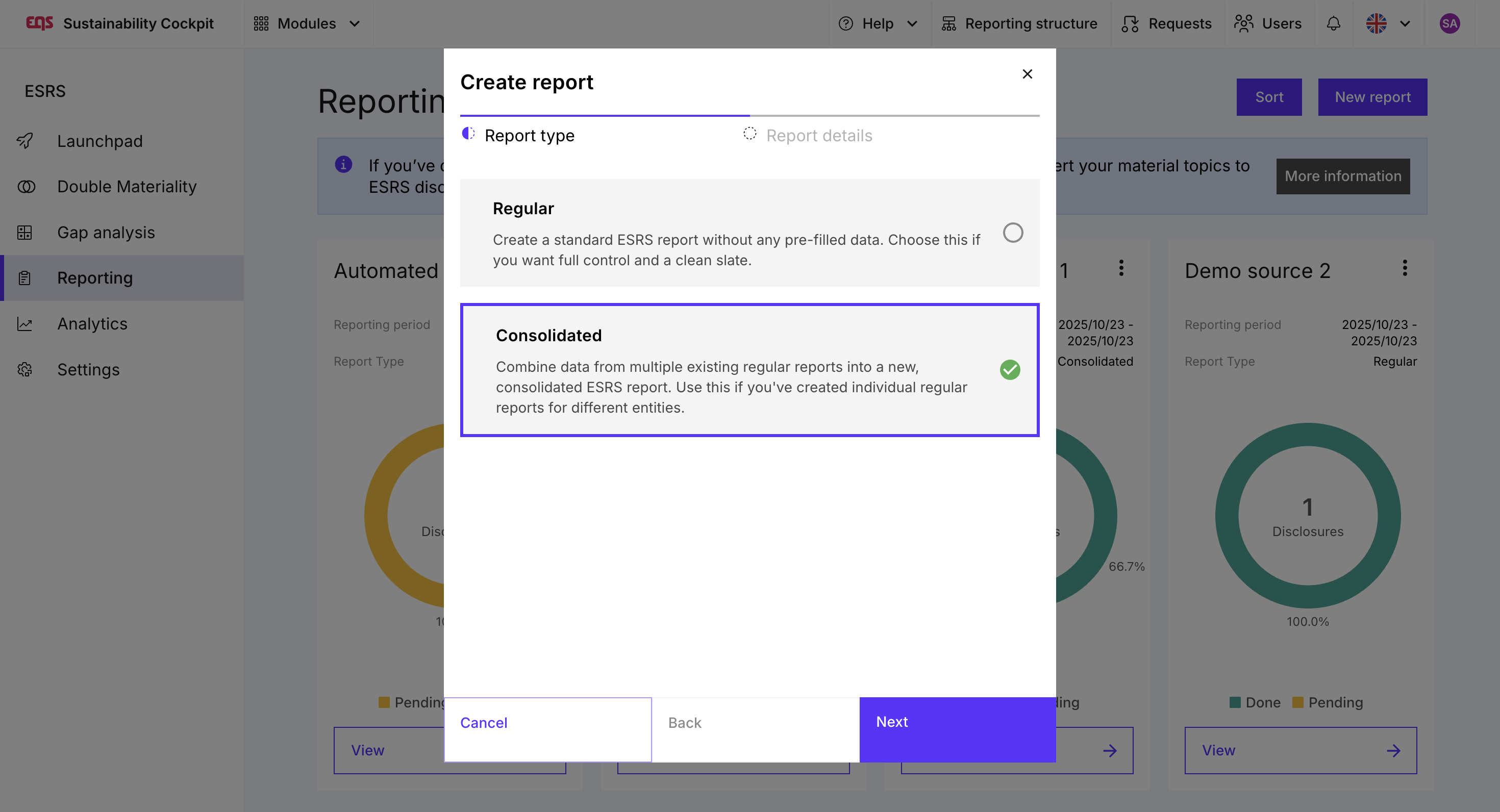
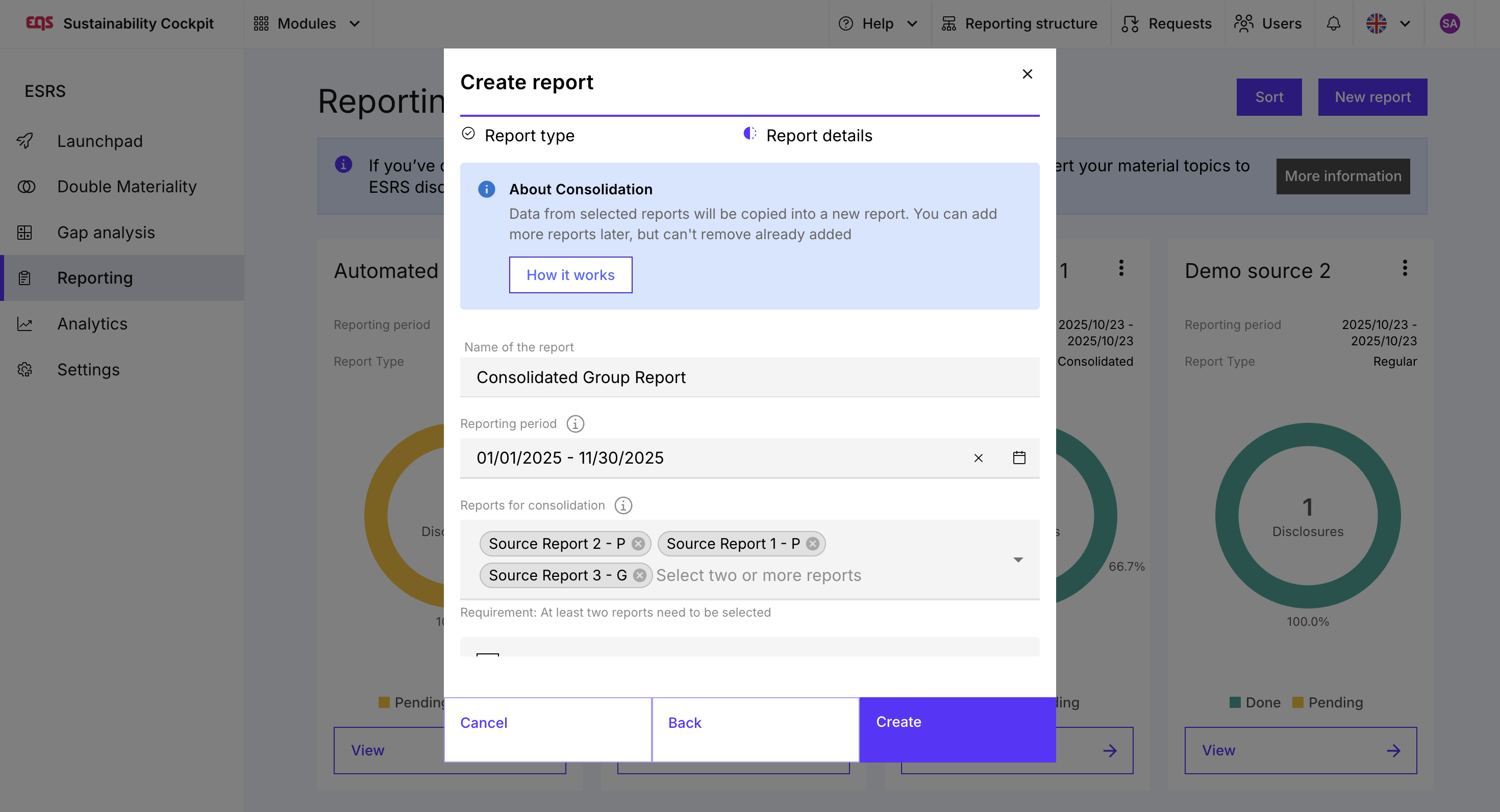
Click on "New Report" and select "Consolidated" as the report type. Enter the report details such as name and reporting period, then select the reports to be consolidated, and create the report.
Opening the Report
After creation, you are directly taken to step 2. Step 1, which defines the scope of reporting, is already completed and is based on the reporting framework of the included reports. If you would like to review or adjust the scope, you can reopen this step at any time.
Step 1: Determine Scope
In this step, you define which disclosure requirements and data points should be part of the consolidated report. By default, all data points included in at least one of the included reports are also enabled in the consolidated report scope.
Data points that should not be part of the consolidated report can be excluded. However, it is not possible to add new data points that were not included in any of the source reports, as no data collection exists for them.
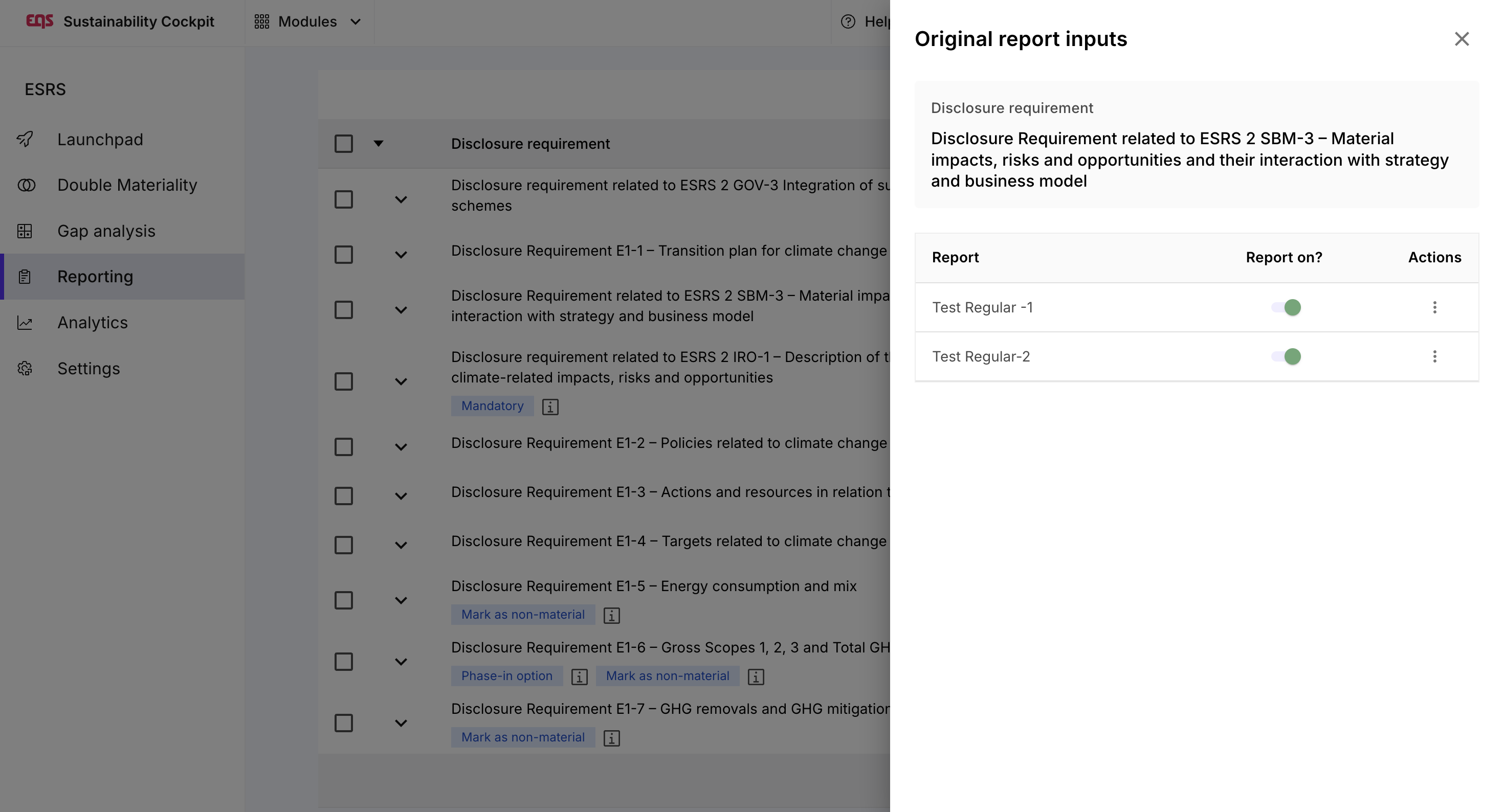
The menu allows you to view the original report entries, including the reasons for excluding individual disclosure requirements or data points, as well as an overview of which source reports they were included in or excluded from.
Step 2: Summarize Data
The goal of this step is to merge the existing values and content from the source reports.
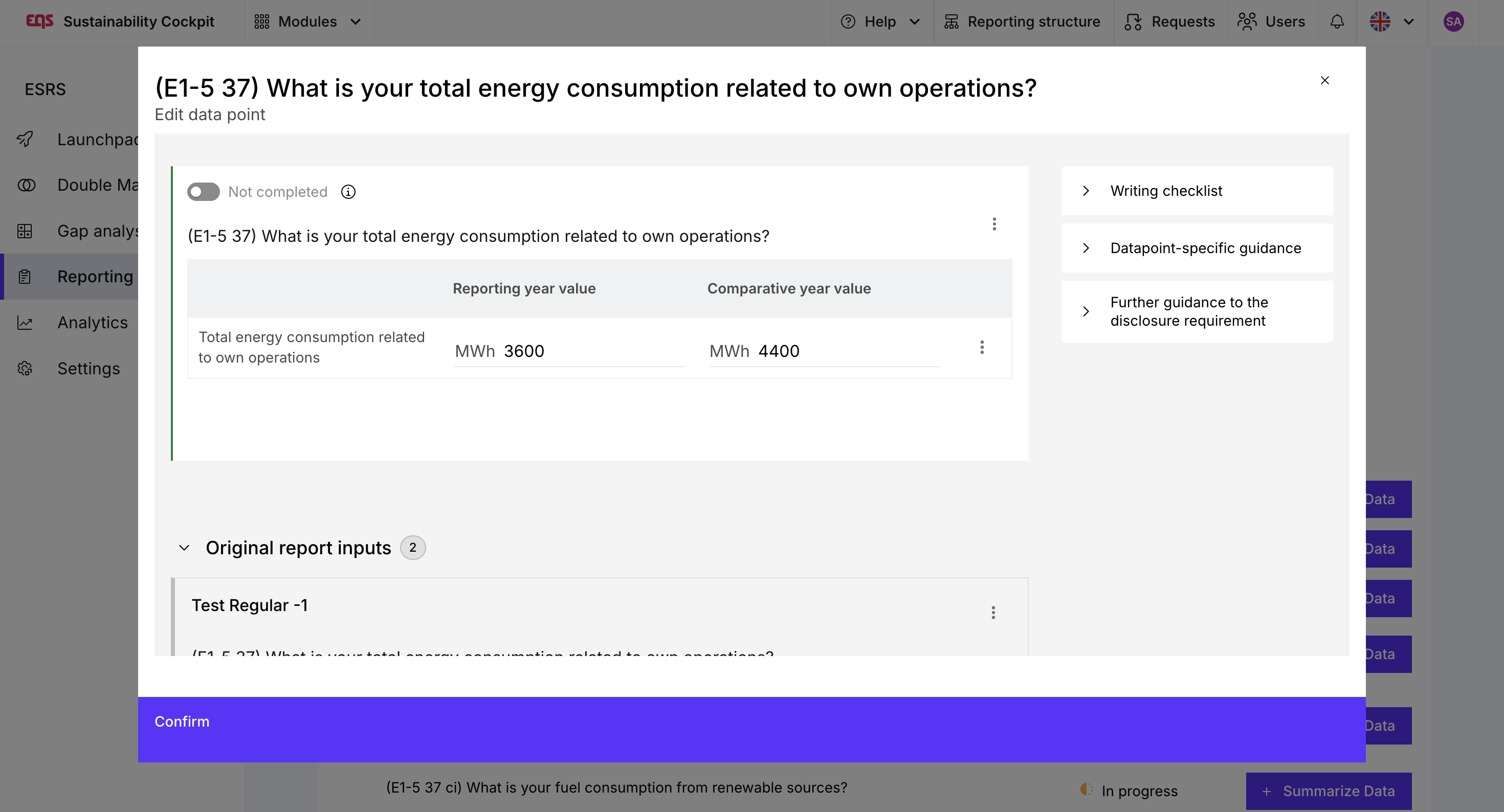
To do this, click on "Summarize Data" at the data point level. The values from the original report entries will appear below the respective data point.
- For aggregated, quantitative values, the values are automatically calculated for the consolidated report.
- For qualitative information such as text fields, the original report entries can be automatically summarized by the AI by clicking on "Generate automatically".
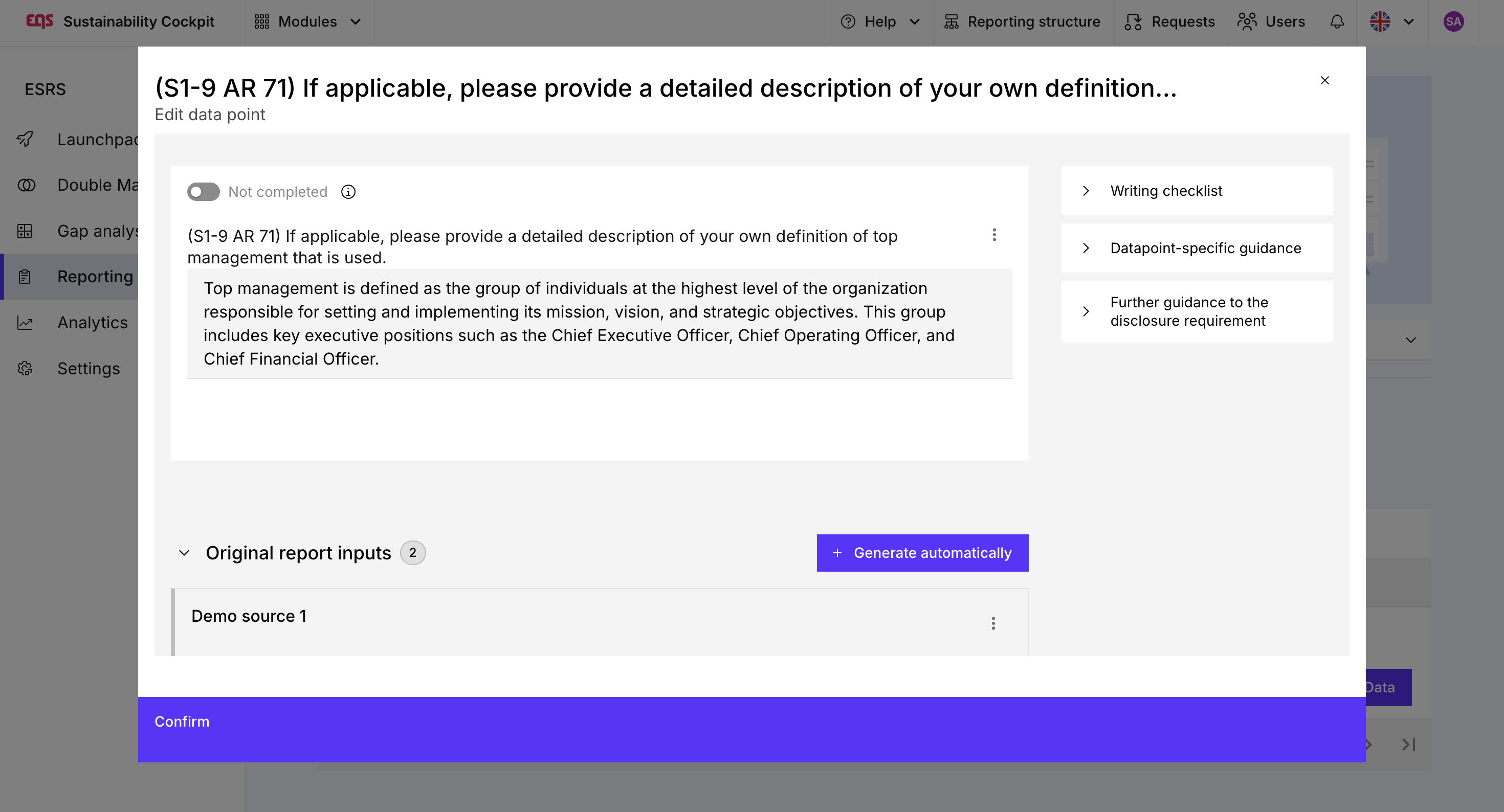

The menu of a data point also allows you to initiate collaboration if support is needed in merging the data and other colleagues should be involved. The menu also shows how the data was aggregated in the source report, as well as further details such as history, comments, and attachments.
Step 3: Write Report
In this step, the final report paragraph is written. The original report paragraphs from the source reports are displayed below the text field. Here, too, the report text can be summarized by the AI with a click on "Generate automatically". The completed report sections can then be finalized by clicking on "Mark as completed".

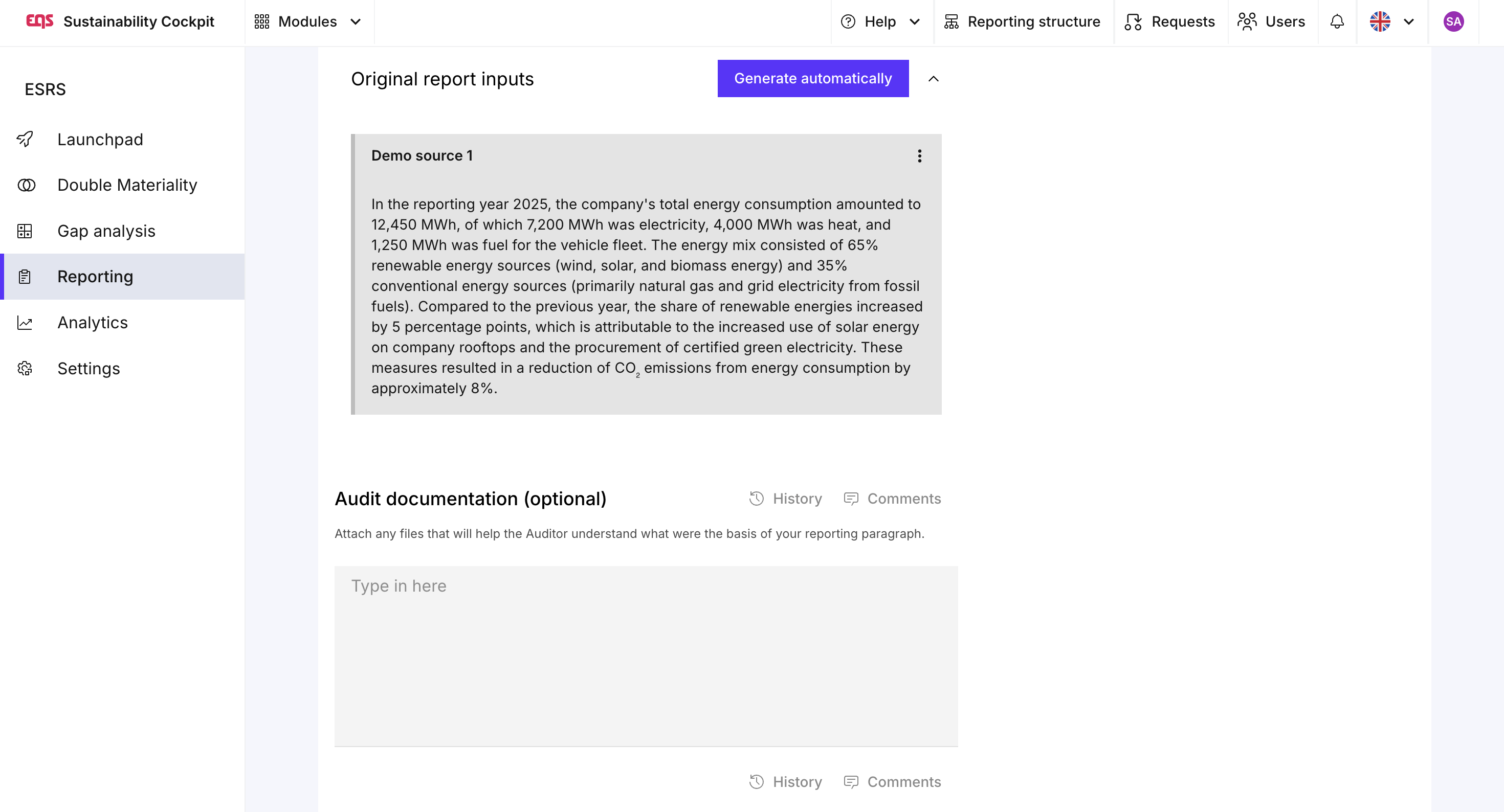

Why are my original report input not displayed?
Report entries are only displayed if the corresponding data point in the source report has been fully completed. Therefore, it's best to ensure that all data points and steps are fully completed before consolidation.
Was this article helpful?
That’s Great!
Thank you for your feedback
Sorry! We couldn't be helpful
Thank you for your feedback
Feedback sent
We appreciate your effort and will try to fix the article