
-
How to get started
- General set-up
- DMA & ESRS
- EU-Taxonomy
- CO2-Footprinting
- Supply Chain Sustainability
- VSME
-
ESRS
- ESRS - Overview
-
DMA Double Materiality
- The Double Materiality Proc...
- Double Materiality Assessme...
- Start or import your Double...
- Copying a Double Materialit...
- Transferring Data from an E...
- Add and manage stakeholders
- How to involve stakeholders...
- Which stakeholders to invol...
- Select your relevant sustai...
- Add the impacts, risks and ...
- Upload IROs into the DM pro...
- Assess each impact, risk an...
- Step-by-Step: How to Create...
- Understand your Double Mate...
- Set common definitions for ...
- Consolidation / Determinati...
- Change materiality levels o...
- Assessment Scales: Configur...
-
DMA Double Materiality - IR...
- Agriculture and Farming
- Forestry
- Construction and Engineering
- Energy Production & Uti...
- Water & Waste Services
- Casinos & Gaming
- Leisure Facilities
- Capital Markets
- Banking
- Insurance
- Health Care
- Food & Beverage Services
- Hotels & Lodging
- Aerospace & Defence
- Automobiles & Other Tra...
- Biotechnology & Pharmac...
- Building Products & Fur...
- Chemicals & Biofuels
- Construction Materials
- Electronics
- Food & Beverages
- Machinery & Equipment
- Medical Equipment & Ser...
- Metal Processing
- Oil & Gas - Midstream &...
- Pulp, Paper & Wood prod...
- Textiles, Apparels, Footwea...
- Tobacco
- Toys, Sporting Goods & ...
- Coal Operations
- Gap Analysis
-
ESRS Data Collection & ...
- Create a new ESRS report
- Include Your Double Materia...
- Copy data from an existing ...
- Copy data from an existing ...
- Importing CO2 Data into an ...
- ESRS report, step 1: determ...
- ESRS report, step 1 (1): om...
- ESRS report, step 2: prepar...
- ESRS report, step 2 (1): Da...
- ESRS report, step 2 (2): Di...
- ESRS report, step 3: collec...
- ESRS report, step 3 (1): Un...
- ESRS report, step 3 (1): Un...
- ESRS report, step 4: writin...
- Mapping of Sustainability T...
- Download datapoints
- Consolidating ESRS Reports
- Audits: Review and Compare ...
- Analysis & Dashboard
- Guide to Handling Requests ...
-
EU Taxonomy
- Data collection
- Eligibility assessment
- Minimum safeguards
- Alignment assessment
- Adding financial data for E...
- Accounting standards
- Analytics & Reporting
-
CO2 Footprint
- CO2 - Overview
- Data Collection
- Activities
-
Scopes
- Scope 1 - Emissions from so...
- Scope 2 - Emissions that re...
- (2) Scope 2-Emissions: Mark...
- Scope 3.1 - Emissions assoc...
- Scope 3.2 - Emissions assoc...
- Scope 3.3 - Emissions resul...
- Scope 3.4 - Emissions assoc...
- Scope 3.5 - Emissions assoc...
- Scope 3.6 - Business Travel
- Scope 3.7 - Employee commuting
- Scope 3.8 - Emissions resul...
- Scope 3.9 - Emissions gener...
- Scope 3.10 - Emissions gene...
- Scope 3.11 - Emissions gene...
- Scope 3.12 - Emissions gene...
- Scope 3.13 - missions resul...
- Scope 3.14 - Franchises
- Scope 3.15 - Investments
- How to assign scopes (in th...
- Scope 3.4 and Scope 3.9: Ca...
- Scope 3 Reporting: Process,...
- Emission factors
- Old flow
-
Supply chain risk
- Module settings
- Supplier management
- Risk assessment
- Grievance mechanism
- Incidents
- Reporting
- Information for suppliers
- Guide to Handling Requests ...
-
VSME
-
VSME Data Collection & ...
- VSME Module – Roles & P...
- Create a new VSME report
- Importing CO2 Data into a V...
- VSME - Basic Module
- VSME - Comprehensive Module
- VSME report, step 1: Determ...
- VSME report, step 2: Prepar...
- VSME report, step 2 (1): Da...
- VSME report, step 2 (2): Di...
- VSME report, step 2 (3): Us...
- VSME report, step 2 (4): Co...
- VSME report, step 3: collec...
- VSME report, step 4: writin...
- Reusing ESRS Data for Your ...
- Sustainability Profile
-
VSME Data Collection & ...
-
General settings and config...
- Account Settings
- Log-in process
- General User Management
- Data requests, review and v...
- Reporting Structure
-
Product & Regulatory up...
-
Software Updates
- EQS Software updates: 4. Se...
- EQS Software Updates: 12. J...
- EQS Software Updates: 13. M...
- EQS Software Updates: 21. A...
- Simplified ESRS Draft in th...
- EQS Software Updates: 25. M...
- EQS Software Updates: 12. M...
- EQS Software Updates 6. Mar...
- EQS-Software Updates: 24. F...
- EQS-Software Updates: 8. Ja...
- Introducing ESRS Consolidat...
- EQS-Software Updates: 10. N...
- EQS-Software Updates: 24. O...
- EQS-Software Updates: 22. S...
- Updates to the VSME Module:...
- CO₂ Workflow Update
-
Regulatory Updates
- EQS Regulatory Update: 19. ...
- EQS Regulatory Updates: 17....
- EQS Regulatory Updates: 25....
- EQS-Regulatory Updates 13. ...
- EQS-Regulatory Updates 15. ...
- EQS Regulatory Updates 24. ...
- EQS Regulatory Updates 10. ...
- EQS Regulatory Updates 13. ...
- EQS-Regulatory Updates 23. ...
- EQS-Regulatory Updates 28. ...
- EQS-Regulatory Updates 8. J...
- Sustainability Knowledge
-
Software Updates
-
Reduction Planner
- Reduction Planner
Start Your Reduction Plan
Modified on Fri, 17 Apr at 10:43 AM
The Reduction Planner enables you to translate climate targets (e.g. Net Zero or SBTi-aligned targets) into a structured, actionable roadmap.
Instead of only defining a target, you can:
- Build reduction pathways over time
- Define and track concrete measures
- Combine measures into scenarios
- Understand impact vs. cost trade-offs
This guide walks you through how to set up your first reduction plan.
Step 1: Open the Reduction Planner
Navigate to Reduction planner on the left menue of you CO2 module
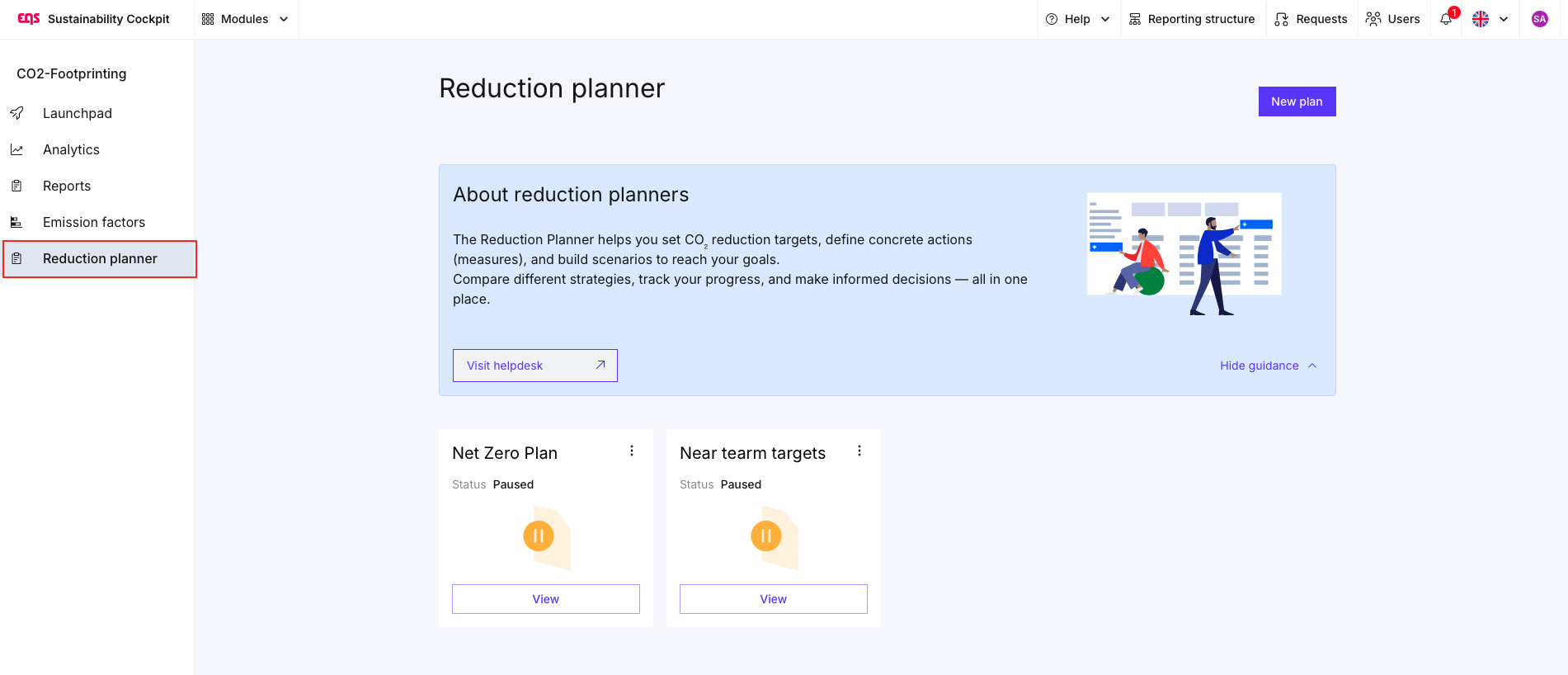
This is the central workspace where all reduction plans, targets, measures and scenarios are managed. To work in the Reduction palanner you need to have at least one completed report in you CO2 module.
Step 2: Create a new reduction plan
Click on “New plan” in the top right corner.
A reduction plan represents a specific target pathway, for example:
- A Net Zero strategy
- Near-term SBTi targets
- Internal planning scenarios (e.g. budget-constrained vs. ambitious)
Choose a title for you plan, link it to a report and assign it to a year. This is the Baseyear data thats used to calculate the forward projections.
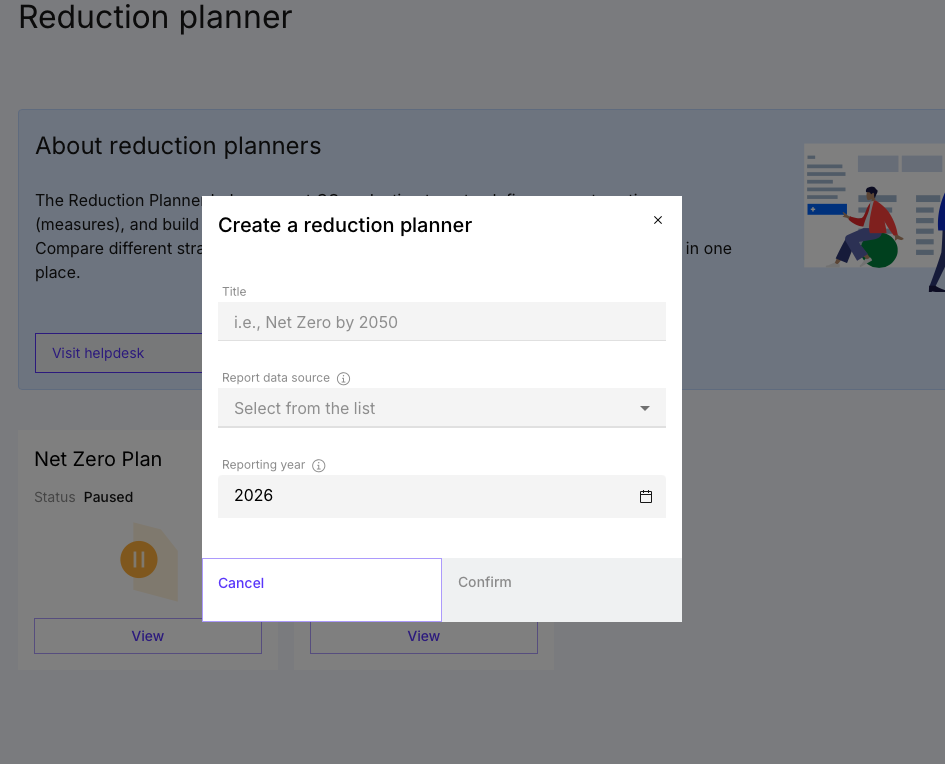
Important:
Each plan is independent and can contain its own assumptions, measures, and scenarios.
Step 3: Understand the logic of the Reduction Planner
Before setting up your plan, it’s important to understand how the tool works conceptually:
1. Target (Where do you want to go?)
Defines your reduction ambition over time
→ e.g. 50% reduction by 2030 or Net Zero by 2040
2. Measures (What will you do?)
Concrete actions that reduce emissions
→ e.g. renewable electricity, supplier engagement, efficiency improvements
3. Scenarios (How do you get there?)
Combinations of measures that form a pathway
→ allows comparison of different strategies
? Screenshot – Plan overview / structure
? This structure ensures that your plan is not only compliant (e.g. with SBTi), but also operational and actionable.
Step 4: Define your reduction target
Start by defining the overall target of your plan:
- Select a target type (e.g. Net Zero or custom target)
- Set a target year
- Define your reduction ambition (e.g. % reduction vs. baseline)
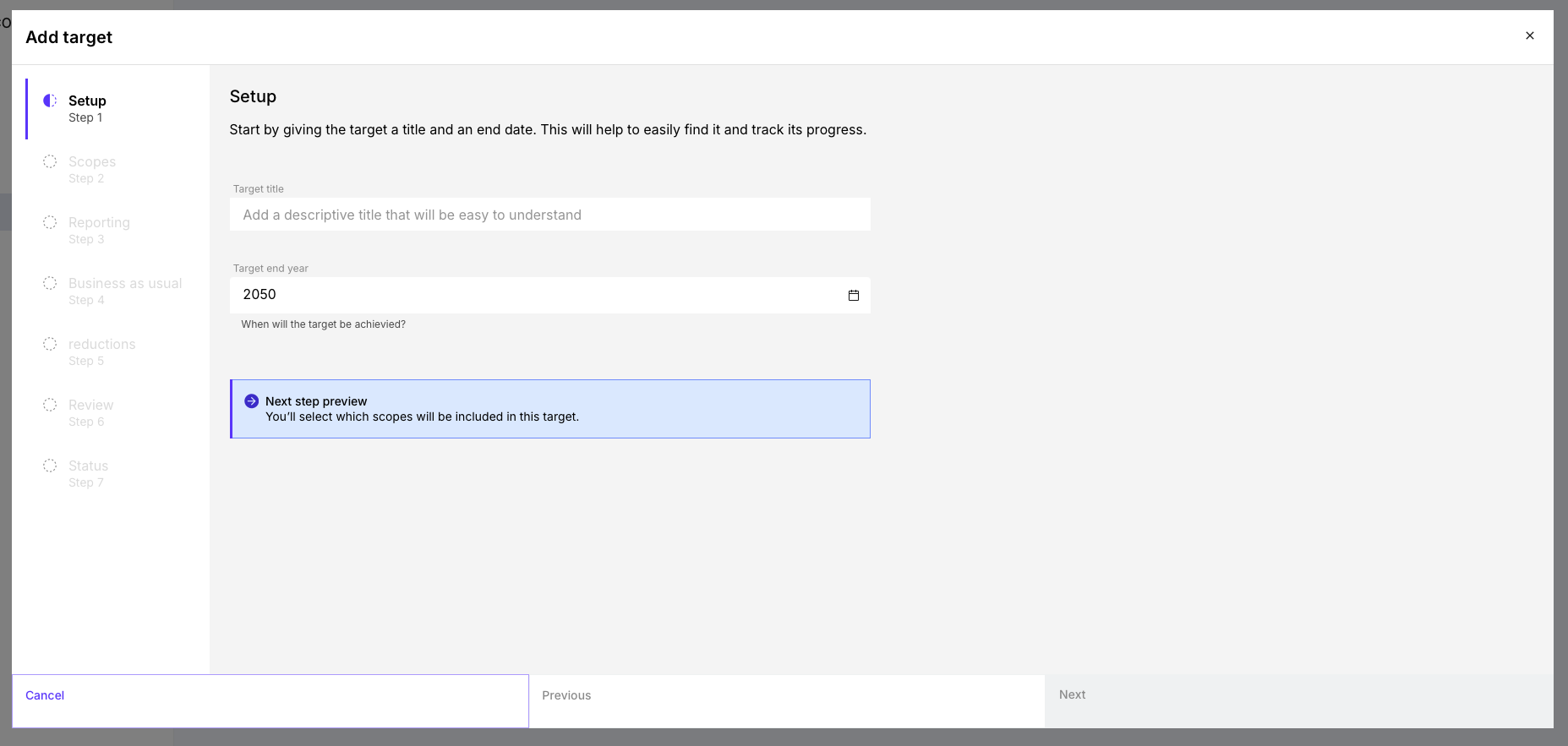
More about how to set targtes here.
Step 5: Add reduction measures
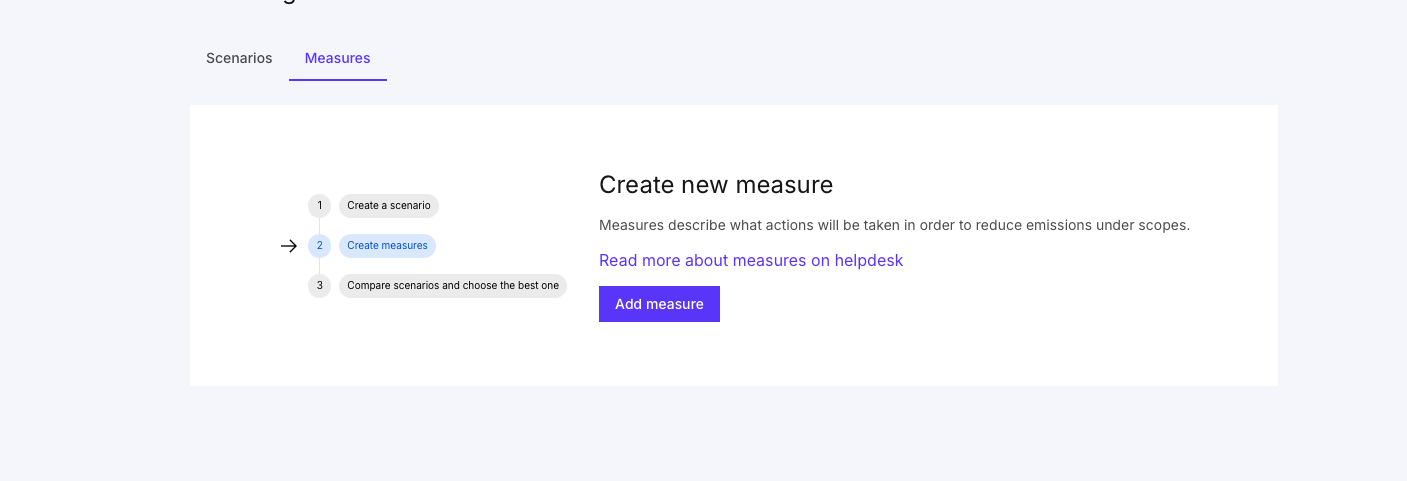
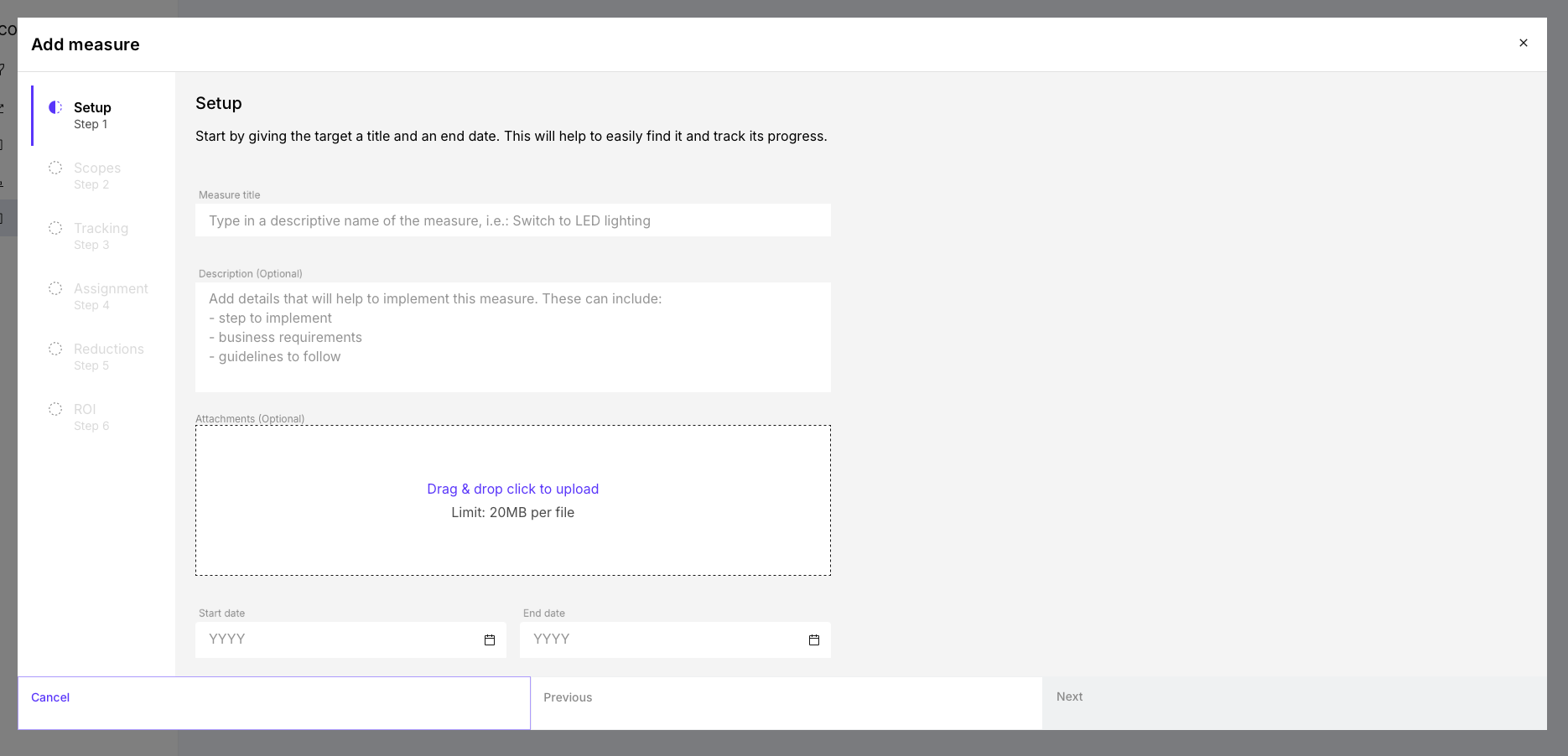
Once the target is defined, you can start adding measures.
Each measure represents a specific decarbonization action and includes:
- Emission source / scope (what is affected)
- Reduction potential (how much CO₂ can be reduced)
- Timeline (when it takes effect)
- Optional: costs / investments
Best practice:
- Start with high-impact measures
- Use realistic assumptions (not idealized values)
- Align measures with your existing sustainability strategy
Measures are the core driver of your plan – they determine whether your target is achievable.
More about measures here.
Step 6: Build and compare scenarios
Scenarios allow you to combine multiple measures and evaluate their joint impact.
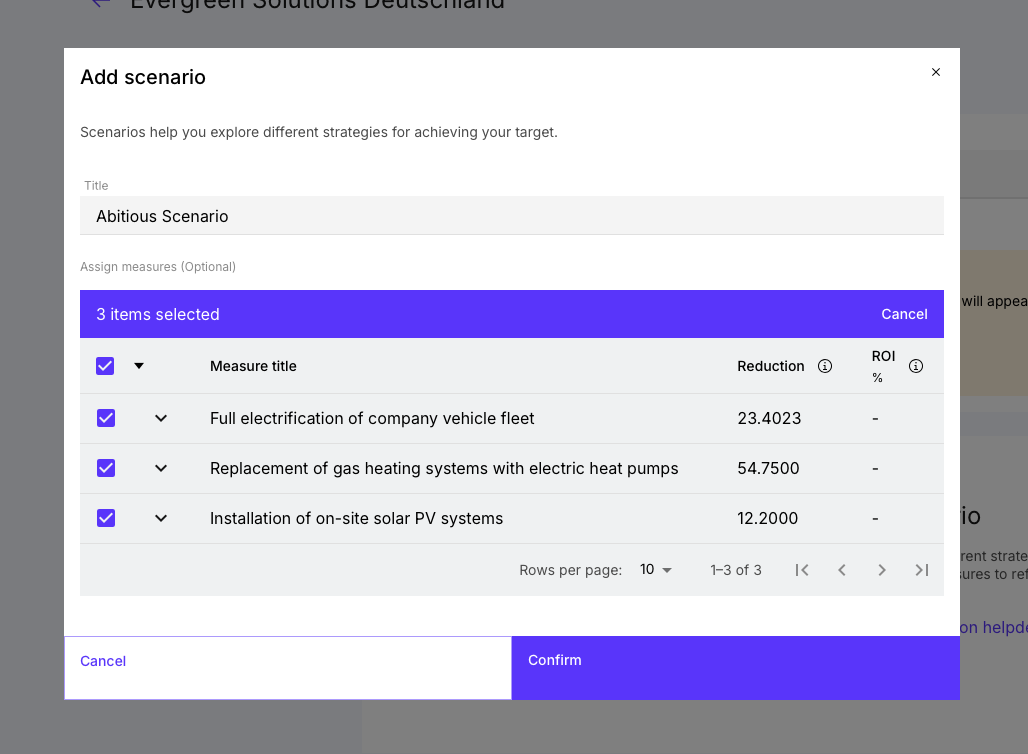
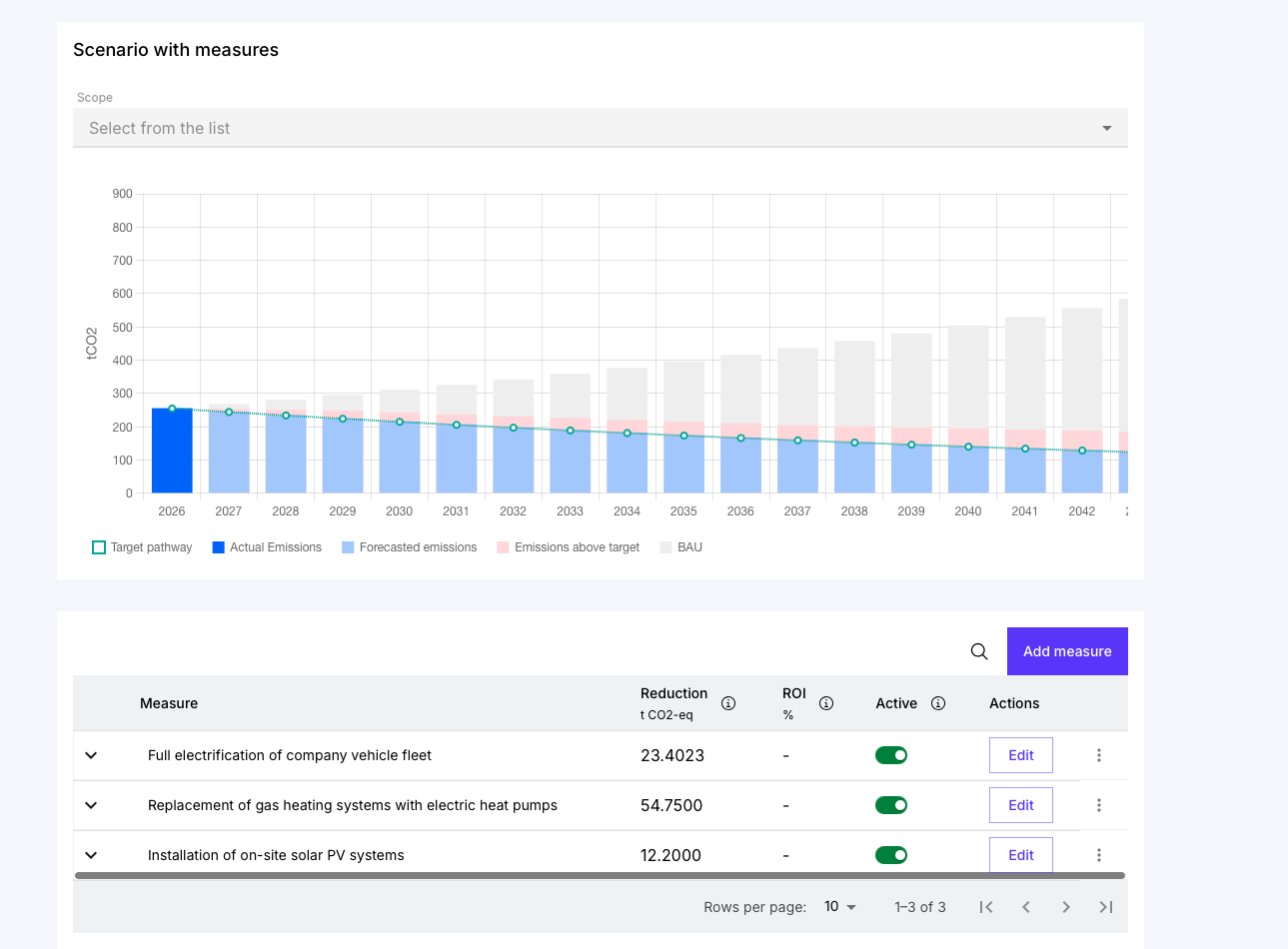
With scenarios, you can:
- Check if your measures close the gap to your target
- Compare different strategies
- Understand cost vs. impact trade-offs
- Identify the most efficient pathway
This is where the Reduction Planner goes beyond simple target-setting and becomes a decision-making tool.
Read more on how to use Scenarios here.
Step 7: Track progress and refine your plan
Reduction planning is an iterative process.
You can continuously:
- Adjust measures
- Refine assumptions
- Add new initiatives
- Compare updated scenarios
This ensures your plan remains:
- Realistic
- Data-driven
- Aligned with business constraints (e.g. budget, feasibility)
Was this article helpful?
That’s Great!
Thank you for your feedback
Sorry! We couldn't be helpful
Thank you for your feedback
Feedback sent
We appreciate your effort and will try to fix the article