
The Eligibility Assessment is the first substantive step in EU Taxonomy reporting. It determines which of a company’s economic activities may fall within the scope of the EU Taxonomy.
In the tool, you document these activities, assign the relevant Taxonomy code, and then use the Materiality option to decide whether the activity requires a detailed follow-up assessment.
Note: This article supports the use of the tool. The legal classification of activities, selection of activities, and financial data should be agreed with the responsible business teams, Finance, and—where appropriate—advisers or auditors.
Eligibility vs. Alignment
The EU Taxonomy distinguishes between two stages:
| Stage | Meaning |
|---|---|
| Taxonomy-eligible | The economic activity is described in the EU Taxonomy legal acts and can, in principle, be assessed. |
| Taxonomy-aligned | The activity additionally meets the technical screening criteria, makes a substantial contribution to at least one environmental objective, does not significantly harm any other objective (Do No Significant Harm), and meets the minimum safeguards. |
The Taxonomy covers six environmental objectives, including climate change mitigation, climate change adaptation, circular economy, and biodiversity. A Taxonomy-eligible activity is therefore not automatically sustainable or Taxonomy-aligned. EU Taxonomy Regulation
Preparation: identify activities and financial data
The Eligibility Assessment usually starts outside the tool:
Identify the company’s economic activities.
Assess which activities may fall within the EU Taxonomy.
Assign the relevant Taxonomy codes.
Determine the related turnover, CapEx, and—where applicable—OpEx for each activity.
Assess financial materiality.
NACE codes can support the research, but they are only a starting point. The specific activity description and the criteria in the applicable EU Taxonomy legal acts are decisive, including the currently applicable delegated acts and their amendments. For a structured approach to mapping NACE codes and Taxonomy classifications, see Selecting the right activities. Current legal acts and consolidated versions are available through the EUR-Lex portal.
Add an activity in the tool
Open the relevant Taxonomy Report. You will automatically be navigated to "Eligibility".
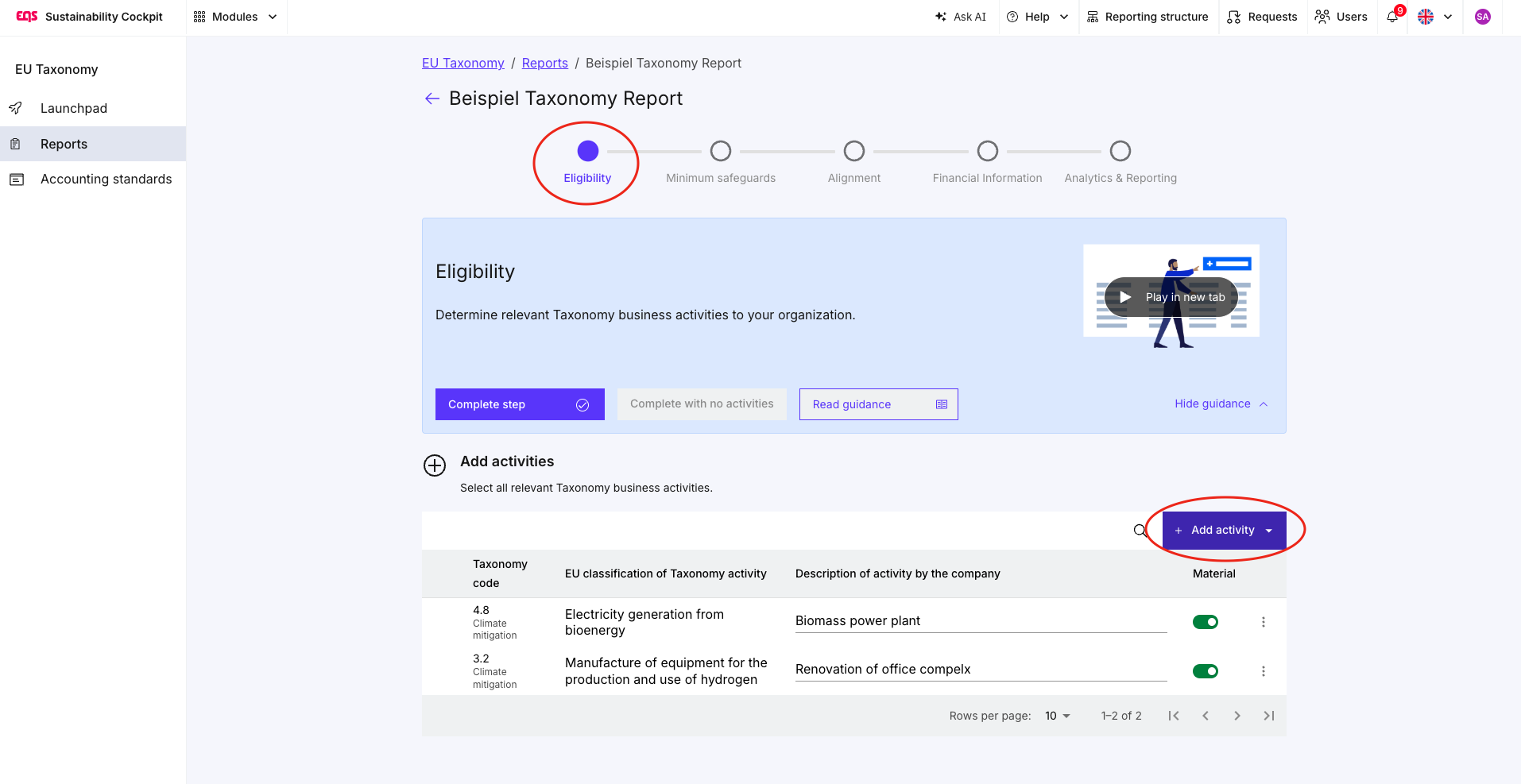
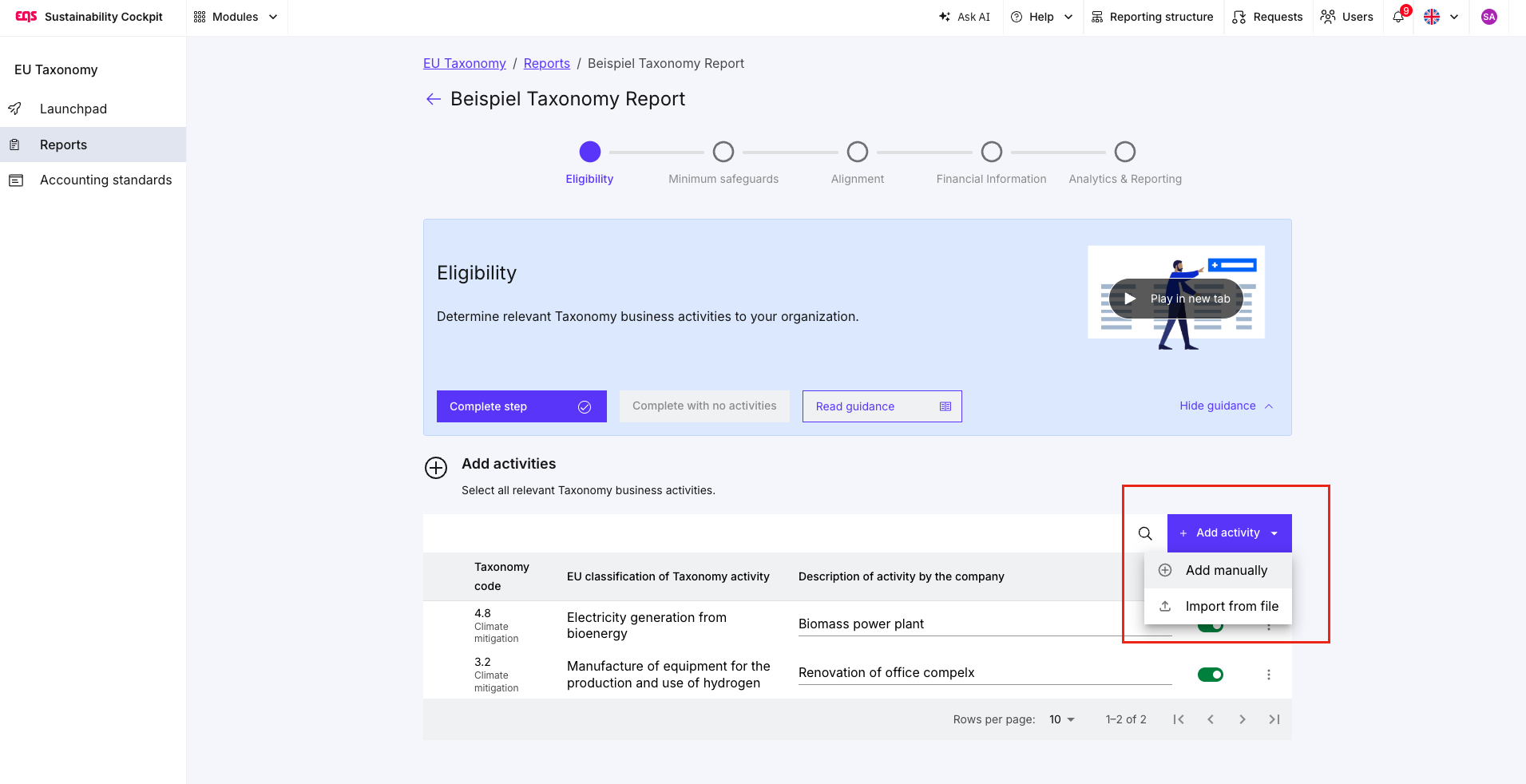
Add the activity manually or import it.
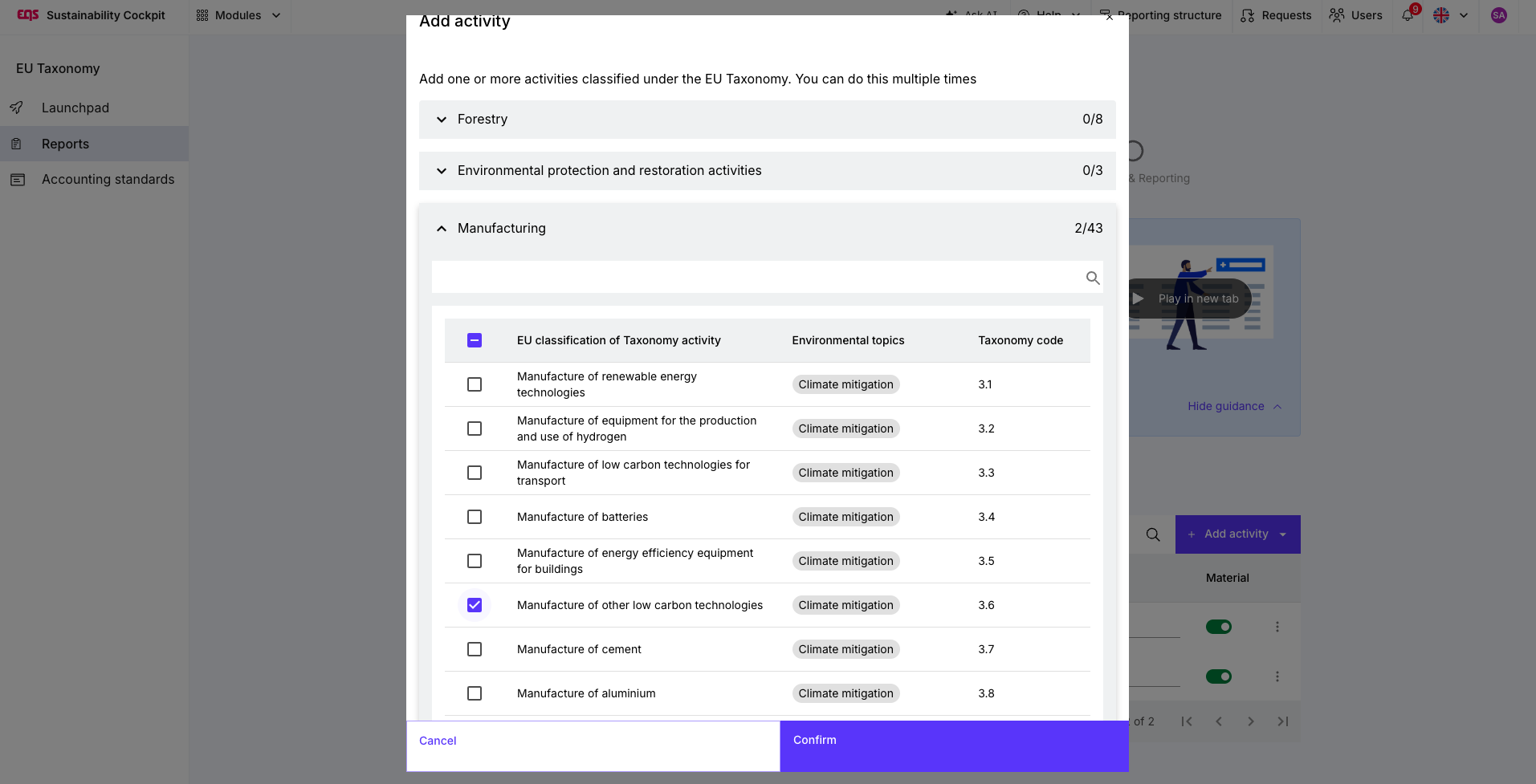
Select the applicable Taxonomy code.
Add a clear, company-specific description.
Review and set the Material option.
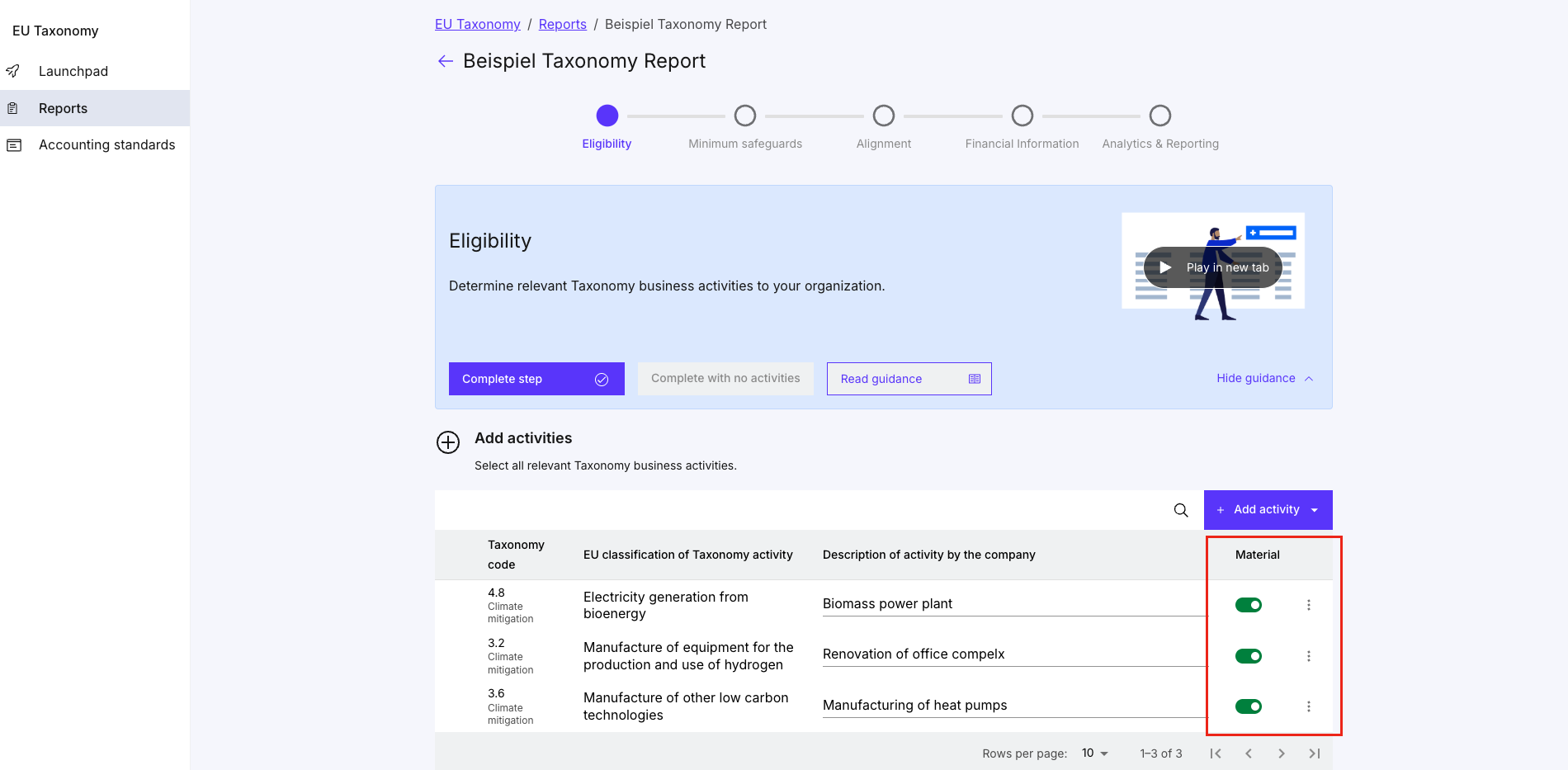
The description should clearly identify what is being assessed within the company. For example: “Installation and operation of photovoltaic systems at own production sites”.
Avoid vague descriptions such as “Energy” or “Investment 2026”. A precise description supports alignment with Finance and facilitates later review.
The Materiality option in the tool
The Material option determines whether a Taxonomy-eligible activity goes through the detailed follow-up assessment.
| Selection | Effect |
|---|---|
| Material enabled | The activity is assessed in the subsequent Minimum Safeguards and Alignment steps. |
| Material disabled | The activity is treated as non-material and does not need to go through the detailed follow-up assessment. Its financial information remains relevant. |
Non-material activities are not simply removed from the report. They are shown separately as “Not assessed activities considered non-material.”
How to determine materiality
The Materiality option refers to financial relevance for Taxonomy reporting. It is not the same as double materiality under ESRS.
Under the simplified EU Taxonomy disclosure rules, non-financial undertakings may treat activities as non-material where their share is cumulatively below 10% for the relevant KPI. The assessment must be performed separately for:
turnover
CapEx
OpEx
An activity may therefore be non-material for turnover but material for CapEx. Activities that are not assessed must still be transparently disclosed, including their financial share, the relevant economic sector, and the rationale for the materiality decision. European Commission: Q&A on Taxonomy simplifications
Important: Do not assess activities in isolation. Add up the relevant shares for each KPI before making a materiality decision.
Example: KPI-specific materiality
A company identifies three potentially Taxonomy-eligible activities:
| Activity | Share of turnover | Share of CapEx |
|---|---|---|
| Charging infrastructure | 4% | 5% |
| Photovoltaics | 3% | 4% |
| Building renovation | 2% | 3% |
| Total | 9% | 12% |
For the turnover KPI, the activities are cumulatively below 10%. For the CapEx KPI, they are material.
Because the activity requires a detailed assessment for at least one relevant KPI, the Material option should remain enabled in the tool. Document the KPI-specific distinction in your working papers and agree it with Finance and your audit team. This prevents an activity that is material for CapEx from being excluded inadvertently from the Minimum Safeguards and Alignment assessments.
Recommended workflow
Collect potential activities
Record all activities that may be Taxonomy-eligible.Assign the Taxonomy code and description
Add the activity manually or through an import.Obtain financial data
Align turnover, CapEx, and OpEx with Finance or Accounting.Calculate materiality for each KPI
Assess the cumulative shares for turnover, CapEx, and OpEx separately.Set the Materiality option
Disable the option only if the activity is non-material based on the agreed assessment.Complete the follow-up assessments
Assess material activities under Minimum Safeguards and Alignment.Review reporting output
Confirm that non-material activities are shown separately in the Summary KPI report.
Special consideration for OpEx
Additional simplifications apply to OpEx. Where the total OpEx KPI is not material to the business model, the detailed OpEx assessment may be omitted under the applicable conditions. The total amount and the rationale must still be disclosed. Where OpEx is generally material, the 10% threshold is assessed separately for the OpEx KPI. European Commission: Q&A on Taxonomy simplifications
Frequently asked questions
Can I classify a non-material activity as not Taxonomy-eligible?
No. Eligibility and materiality are separate decisions. An activity can be Taxonomy-eligible but financially non-material.
Why do I need to provide financial information for non-material activities?
The financial data substantiates the materiality decision and enables separate disclosure in reporting.
Why can I still see the activity in later steps?
The activity may remain visible in the tool. The Materiality selection—not visibility alone—determines whether the follow-up assessment is required.
When should I review the materiality decision?
At least for each new reporting period, and whenever the activity, investment plan, or underlying financial data changes.
Was this article helpful?
That’s Great!
Thank you for your feedback
Sorry! We couldn't be helpful
Thank you for your feedback
Feedback sent
We appreciate your effort and will try to fix the article